One issue that came out that I never got around to fixing till now was the creation of the .FAIL file that is generated if the server has a problem or there is some sort of incompatibility between library systems, such as pin, city name, password length, etc. There is also an issue with the service stopping without notice; which also creates a .FAIL file as shown below.
The OptionKey is a Technology blog. How to tips and useful documentation on Apple, Microsoft, Open Source Project.
Wednesday, July 13, 2022
Using Powershell to send an email alert when a file type is found
Wednesday, November 10, 2021
Photoshop ippcvm7.dll Error on Hyper-V
Downsizing systems can be hard but to make space virtualization is a great way to go, however sometimes you encounter issues when virtualizing. For instance I needed to virtualize a machine that was running adobe creative cloud. Now by default since I use different generation processors, I typically turn on processor compatibility.
However with Adobe Creative Cloud this causes an error that seems to be related to Intel SSE 4.2
https://helpx.adobe.com/photoshop/kb/known-issues.html#ErroratloadingofippCVlibrary
The server running the VM is a E5-2680v4 which according to intel Ark, doesn't support the instruction set either. https://ark.intel.com/content/www/us/en/ark/products/91754/intel-xeon-processor-e52680-v4-35m-cache-2-40-ghz.html
However since this machine isn't going to be leaving this virtual server, if you uncheck the Processor Compatibility this enables the requirements for Photoshop and it is able to launch.
Monday, September 27, 2021
"LbShrMem.FindName: invalid 'shared memory' pointer" Error when Launching Reports in Horizon on Windows 10
Variable name: HzShrMemBase
Variable value: 1912602624
However under windows 10 this prevents access to the ILS application but adding and removing the variable fixes it as does running the app in legacy mode for Windows XP SP2 but this is temporary. After a reboot the issue remains persistent. Doing file system scans (SFC) and check disk also occasionally resolves the issue, but the issue remains persistent and comes back after a couple shutdown and restarts.
Make use a local admin
Step 2. - Set the app to run as administrator
Step 3. - Change UAC (Reason for this is to prevent the popup prompt)
After running the ILS application like this for 3 weeks I am confident that the issue has been mitigated. Do I recommend running an application like this? No. However it was consuming IT resources having to go back and disk scanning, adding/removing system variables to get the report to run. There is extra security precautions put on to the system for monitoring and firewall blocking. For now that is all that can be done until an application update.
Wednesday, December 12, 2018
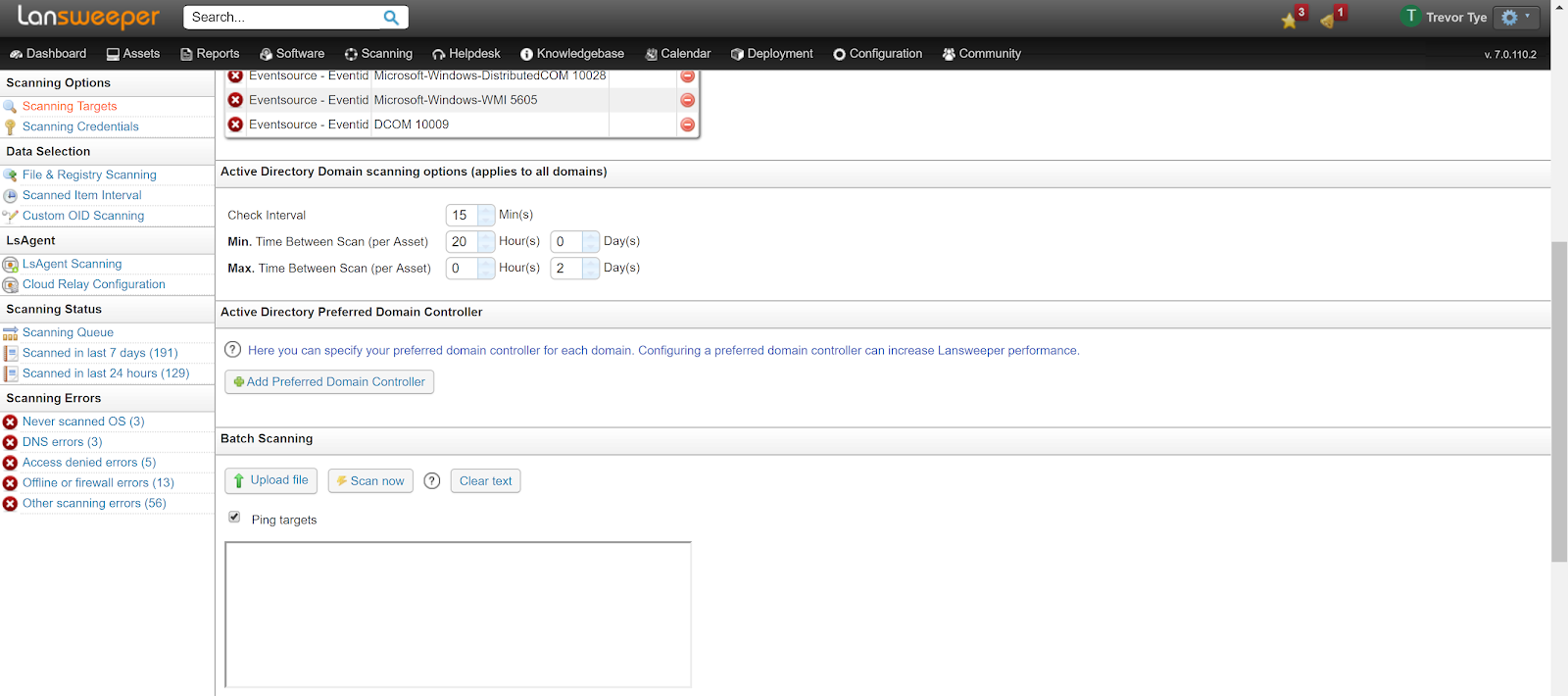
Fixing Lansweeper Active Directory USER LDAP Syncing Error
![]() |
| LDAP ERROR |
And setup a new scan
![]() |
| Setup a new scan after the preferred ad controller has been removed |
![]() |
| Lansweeper Syncing with AD |
After the scan the Users started to sync with the AD Controller again. However having had this issue once before, you may need to reboot the lansweeper server if the users continue to have the LDAP error after the rescan. After the reboot the LDAP Error should be gone.
Friday, May 25, 2018
Windows Printer Driver Causes Lexmark Firmware Error 900
Our Lexmark MX1145 MFP has been setup on our Server 2012R2 Server using Printer Driver version 1.2.0.0 though our ethernet network. This appears to be an issue with a gif file embedded in the email.
The Setup:
Windows Server 2012R2 Active Directory deployed printer using driver version 1.2.0.0, to a Windows 10 Pro Client using chrome and gmail.
What Causes it:
The client prints a page in printer layout format in chrome (gmail) and when the job is sent to the printer causes a firmware error 900. I believe it is an issue with the Gif file embedded in the email as viewing source and printing did not cause a crash, neither did saving the file to a PDF. It also crashes on other emails that we have from the same place, not just this one off email.

When you go to print the printer immediately crashes.

Resolution:
Update to the Universal Printer Driver Version 2XL (2.11.0.0). The troublesome emails didn't crash the printer anymore.
Monday, November 27, 2017
ENETUNREACH FTP Error in Filezilla caused by Kaspersky Security Center 10
![]() |
| Filezilla FTP ENETUNREACH Error caused by Kaspersky Security Center 10 |
If your using Kaspersky Security Center 10 and Filezilla for any FTP services you may require if you don't have a proper policy in place you will encounter the following error
Error: The data connection could not be established: ENETUNREACH - Network unreachable
To resolve the error and allow your users to FTP again you need to make the following changes in your policy.
Right click on the policy and go Properties.
Go to Anti-Virus Protection -> General Protection Settings -> Monitored Ports Settings
De-select/uncheck the FTP port as shown in the image below.
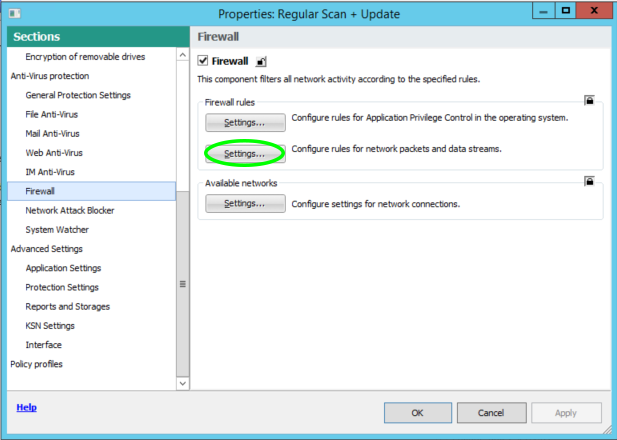
Hit OK then go to Firewall Settings -> Configure Rules for Network Packets and Data Streams
After you add the rule you can move it to the top of the list to ensure it doesn't get blocked by another rule. You can also limit this to particular IP addresses if you only want specific users to have access.
Hit Ok -> Hit Apply -> Hit Ok
That's it your done.
Special thanks to Pavel Labanov and his great YouTube video also documenting how to fix this issue.
Thursday, June 29, 2017
Microsoft Hyper-V Integration Services Error 1603
| Hyper-V Integration Services Requires and Upgrade and will not Upgrade |
| Error Code on Server 2003 |
Thursday, November 21, 2013
Freenas Format Error: Operation Not Permitted
Freenas Format Error
If your trying to erase a drive in freenas and you get an error "Can't Erase Drive /dev/To solve this turn off the sysctl variable from the console.
sysctl kern.geom.debugflags=0x10
Removing Show Recent History and Recently Open Documents from Windows Explorer
How to remove the Recent History and Recently Open Documents from Windows Explorer Using the Registry Editor Press the Windows Key + R, type...
-
When working in a test environment you don't exactly want something to have internet access; so you need to be able to download files in...
-
To see a video of the Rustdesk installation visit https://www.youtube.com/watch?v=t7UobpjDsRY and if you like the content please like and s...
-
Quick guide: Automatic login in Windows 10 Open the Registry Editor using [Windows] + [R] and “regedit” . Enter HKEY_LOCAL_MACHINE\SOF...