Showing posts with label ftp. Show all posts

Monday, November 27, 2017

ENETUNREACH FTP Error in Filezilla caused by Kaspersky Security Center 10

 Server/client security software is annoying at best but it is even more annoying when things are not clear how to fix a problem much like I had with Kaspersky Security Center 10 and Filezilla.  After a server update a new policy was made and all FTP access was denied from our clients and they needed access for us to continue to do our business.  Here is how to fix the ENETUNREACH Error that you will get if your trying to use Filezilla with Kaspersky.
Filezilla FTP ENETUNREACH Error caused by Kaspersky Security Center 10

If your using Kaspersky Security Center 10 and Filezilla for any FTP services you may require if you don't have a proper policy in place you will encounter the following error

Error: The data connection could not be established: ENETUNREACH - Network unreachable

To resolve the error and allow your users to FTP again you need to make the following changes in your policy.


Right click on the policy and go Properties.

Go to Anti-Virus Protection -> General Protection Settings -> Monitored Ports Settings


De-select/uncheck the FTP port as shown in the image below.


Hit OK then go to Firewall Settings -> Configure Rules for Network Packets and Data Streams
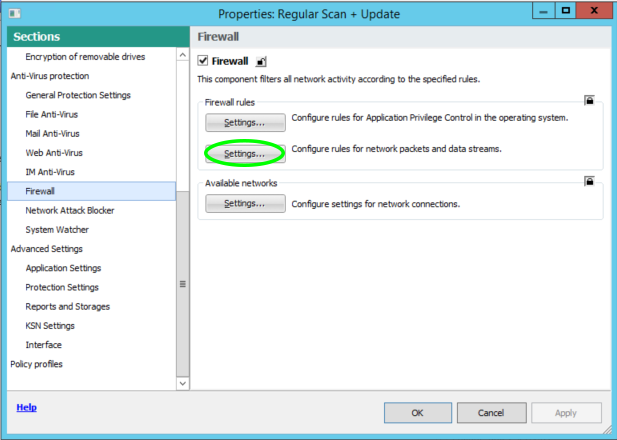

Add a new Network Packet Rule


After you add the rule you can move it to the top of the list to ensure it doesn't get blocked by another rule.  You can also limit this to particular IP addresses if you only want specific users to have access.


Hit Ok -> Hit Apply -> Hit Ok

That's it your done.


Special thanks to Pavel Labanov and his great YouTube video also documenting how to fix this issue.

Wednesday, June 17, 2015

Getting CMD Line FTP to work on Windows with a PFSense Firewall

PFSense Firewall Fix For Windows FTP
With PFSense especially with version 2.2 there is a known bug that it kills Windows Command line FTP (linux and Mac OS FTP though the cmd line work fine), which is a real pain if your on a Windows platform and your trying to automate something where a typical piece of software won't cut it.   There is FTP proxy plugin, but it is in beta, and at least for me it didn't seem to work.  https://forum.pfsense.org/index.php?topic=89841.0  at least it didn't for me.  I'd also rather not open a bunch of ports and have to manage and monitor all the different ports required in the firewall. 

I needed to setup an automated process on a windows client (no choice propriety software requires windows) to FTP text files to a old IBM mainframe FTP.  To work around this issue I found a nice piece of software from IPSwitch called Move It Freely.  You install the software and I highly recommend letting the software create the environmental variable so you can call the software from anywhere in the system.  In your .bat files or VB Scripts if you call ftps instead of ftp it calls the "Move It Freely" client.  Once you are connected make sure you change your transfer type to passive as Windows CMD Line FTP (ftp.exe) defaults with active as does Move it Freely.  That is why in windows FTP you need to put the command QUOTE PASV to enable passive mode.

Documentation for move it freely can be found here. 


Here is an example of a bat file to upload a file.

ftps $HOST -user:$Username -password:$Password
cd $directory
prompt
bin
hash
passive
put $FILE
quit

Removing Show Recent History and Recently Open Documents from Windows Explorer

How to remove the Recent History and Recently Open Documents from Windows Explorer Using the Registry Editor Press the Windows Key + R, type...