So after troubleshooting using the firewall and the Cisco Meraki Switch, testing the WOL from the firewall and the switch, with it successfully running.
The OptionKey is a Technology blog. How to tips and useful documentation on Apple, Microsoft, Open Source Project.
Sunday, March 30, 2025
2025 - Update to How to setup an automated WakeOnLan with Cisco Meraki using MAC allow list
So after troubleshooting using the firewall and the Cisco Meraki Switch, testing the WOL from the firewall and the switch, with it successfully running.
Friday, March 28, 2025
How to setup Intel Vpro with Mesh Commander
I really like VPRO, it is one of the intel technologies that I find extremely useful. I did a post back in 2017 for setting up VPRO on systems so you can remotely manage systems using Mesh Commander.
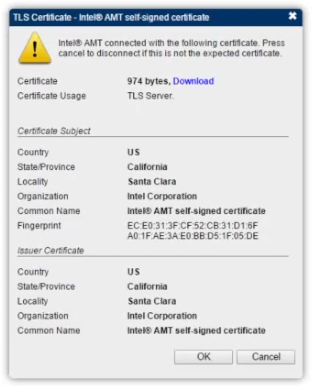
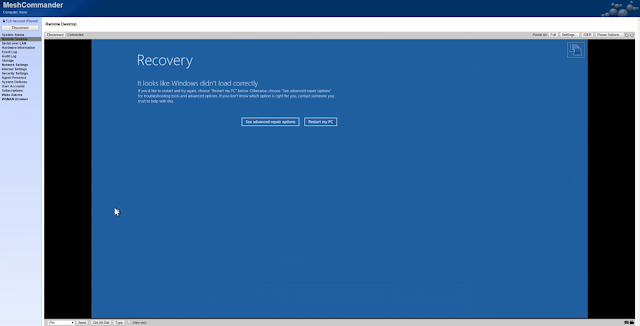
Starting with the 12th generation systems, VPro systems use TLS to connect, which MeshCommander supports. Below is a step by step setup of the BIOS/UEFI Settings required to use VPRO with MeshCommander.
Enter BIOS/UEFI
For User Consent I changed it to none so there is no issue to remotely access the computer, however if it is a user's workstation you may want to set it to KVM or ALL to get permission to access the system.
Once configured you can add the system to mesh commander
Tuesday, March 11, 2025
How to fix clients overwriting other clients in Action 1
Action 1 is a great patch management system. However one thing you should not do is add the action 1 client when imaging, the client should always be added on after or you will need to run a script to clear a registry entry.
The issue looks like this
The client that was imaged shows up but then when the action 1 client is imaged and deployed it doesn't change a registry entry so when you have systems with the action 1 client imaged and deployed the clients over write each other in the action 1 web interface.
Uninstalling and reinstalling the action 1 client will not fix the issue however clearing the registry value should, and should not require re-installing the client.
On the affected system(s) check the registry
HKEY_LOCAL_MACHINE\SOFTWARE\WOW6432Node\Action1The 'agent guid' should be unique, if not stop the service and clear the registry value; then restart the service.
You can also get the information for this fix form Action1
https://www.action1.com/
2) Open Start > Services > Stop 'Action1 Agent' service
3) Open Start > Regedit > Clear 'agent.guid' value
HKEY_LOCAL_MACHINE\SOFTWARE\WOW6432Node\Action1
Thursday, February 20, 2025
Using Powershell in Action1 to update RustDesk
This script can be used to install and update RustDesk using Action1. Action1 is a wonderful cloud based patch management system, though I can create an on prem solution for deploying RustDesk, it was decided that we needed to be able to deploy updates for the software to users at home as well for remote support options as RustDesk is more responsive and faster than Action1. This can be run as a custom script created and saved in the script library in action1
##START COPY
$Folder = 'c:\itTemp'
$URL = 'https://github.com/rustdesk/rustdesk/releases/download/1.3.7/rustdesk-1.3.7-x86_64.msi'
##"Test to see if folder [$Folder] exists"
if (Test-Path -Path $Folder) {
##If it exsists remove it
Remove-Item 'c:\itTemp' -Force
##Is RustDesk Installed? If it is uninstall it.
Get-CimInstance -ClassName win32_product | Where-Object Name -Match "RustDesk" |
ForEach-Object -Process {
Invoke-CimMethod -InputObject $_ -Name Uninstall
}
##Create a temporary folder, download the latest version of RustDesk and install it
New-Item -Path "c:\" -Name "itTemp" -ItemType "directory"
Invoke-WebRequest https://github.com/rustdesk/rustdesk/releases/download/1.3.7/rustdesk-1.3.7-x86_64.msi -OutFile c:\itTemp\rustdesk-1.3.7-x86_64.msi
$pkg = "c:\itTemp\rustdesk-1.3.7-x86_64.msi";
Start-Process msiexec "/i $pkg /norestart /qn" -Wait;
##Wait 30 seconds before removing the directory
Start-Sleep -Seconds 30
##Clean up garbage
Remove-Item -Recurse -Force c:\itTemp\*.*
Remove-Item 'c:\itTemp' -Force
} else {
##If the itTemp folder doesn't exsits remove rustdesk
Get-CimInstance -ClassName win32_product | Where-Object Name -Match "RustDesk" |
ForEach-Object -Process {
Invoke-CimMethod -InputObject $_ -Name Uninstall
}
##Create a temporary folder, download the latest version of RustDesk and install it
New-Item -Path "c:\" -Name "itTemp" -ItemType "directory"
Invoke-WebRequest https://github.com/rustdesk/rustdesk/releases/download/1.3.7/rustdesk-1.3.7-x86_64.msi -OutFile c:\itTemp\rustdesk-1.3.7-x86_64.msi
$pkg = "c:\itTemp\rustdesk-1.3.7-x86_64.msi";
Start-Process msiexec "/i $pkg /norestart /qn" -Wait;
##Wait 30 seconds before removing the directory
Start-Sleep -Seconds 30
##Clean up garbage
Remove-Item -Recurse -Force c:\itTemp\*.*
Remove-Item 'c:\itTemp'
}
##END COPY
Thursday, April 18, 2024
How to fix CURL call imporitng an RSS feed on a site blocking CURL calls
So I wrote a php rss reader that takes an RSS feed that is produced by the page list and built a carousel that is more customizable and updates it's self once a day (see below)
CODE
Crontab changes in Linux 26.04 vs previous versions
I use a small Linux server to control the turning on and shutting off our client stations with crontab. The system I typically use is Ubunt...
-
When working in a test environment you don't exactly want something to have internet access; so you need to be able to download files in...
-
To see a video of the Rustdesk installation visit https://www.youtube.com/watch?v=t7UobpjDsRY and if you like the content please like and s...
-
Quick guide: Automatic login in Windows 10 Open the Registry Editor using [Windows] + [R] and “regedit” . Enter HKEY_LOCAL_MACHINE\SOF...