Showing posts with label network issues. Show all posts

Saturday, February 17, 2024

Hyper-V Cluster Node Keeps Randomly Going Down

Over the last few weeks I had an issue with a Hyper-V Cluster node randomly going down causing issues with my Hyper-V cluster.

Looking at the event logs it looks like it is an issue with the network driver.  It was giving a number of errors including mac address duplication and non-operational status in the logs as shown below.


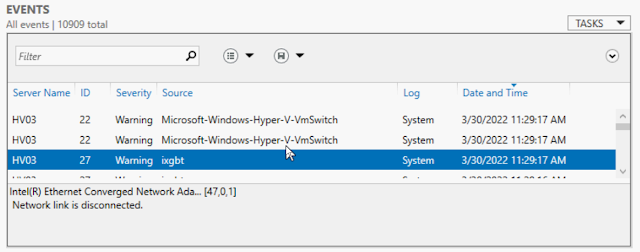
A few different things were done to try resolve the issue, such as a driver re-install, driver update, and a SFC scan.  However the problem persisted for a randomly continuing over a day or two coming on and offline normally for a few hours then dropping and reconnecting.  What I had to do to resolve the issue was in the cluster manager put the node offline then uninstall the network driver; do an offline disk check then reinstall the network driver.  Once that was done and the cluster node came back up and has been stable ever since.


Thursday, May 18, 2017

Troubleshooting Microsoft Failover Cluster Communication Errors Part 1

Hyper-V high availability clusters are great they allow you to better manage your downtime, updates and improve your productivity dramatically, not to mention the benefits of having systems on VHD/VHDX disks that are faster to backup and recover back to.  However it is important to have good infrastructure setup to accommodate the resources required by the Cluster.

The 6 node Hyper-V cluster I had setup starting acting buggy this is after it had been running rock solid for about 2 years.  I keep this cluster pretty up-to-date with current system patches, and I also use Control Up to monitor the real time status of the cluster and a Standalone Hyper-V Server.  (On a side note Control Up helped me diagnose an I/O issue with my Standalone server.  Read Post)


The symptoms were:

  • slow access to the cluster manager
  • cluster node timeouts/drops
  • DNS Errors
  • iSCSI Target Timeouts/Delayed writes
  • Control Up alerts on NIC Packet Errors/Drops
  • Validating Cluster Test -> Network Failure
  • Cluster Update Errors
After having a quick look at the problem and a reboot of a down node where the only issue seemed to be a generic communication/TCP error a reboot of the node in question seemed to resolve the issue; however the issue seemed to be resolved for the work day but would show up again the next morning with communication errors between the nodes.  All the Server managers, Cluster Manager had logs reporting communication failures, migration failures but nothing really more than that so we just kept rebooting the systems in the morning to keep things going until I could come back and troubleshoot the system more thoroughly, but I had suspected that it was the switch the cluster was plugged into.

Cluster Errors Log


After the switch was rebooted everything was performing much better, all the nodes appeared to be happy everything was running fast I was able to move servers onto different nodes.  However there was one issue that came up after the fact it appeared that one of the nodes had been removed from DNS in Active Directory which was causing an issue with the other nodes being able to communicate.  The only place I seen the issue was on a single node that had gotten it's DNS updated and showed the node missing all IP addresses and Microsoft highlights it in red which is very handy.


After re-adding the missing node to the DNS in AD, everything appears to be resolved.  So if you are getting this kind of error make sure you using a switch that can handle the traffic, and double check your Active Directory controllers for DNS and if your DHCP Server to make sure all nodes are getting the address their suppose to be getting and are available on the network.

Another issue that popped up where the cluster was throwing out this error.  "Cluster network name resource 'cluster name' failed registration of one or more associated dns name(s) for the following reason: DNS Server Failure"


I did doing 2 things to repair this issue and this is all done in the Failover Cluster Manager.


1)  a repair of the cluster

  • Right click on the server name and take it offline.
  • Right click on the server name -> More Actions -> Repair


2)  Move the server to another node with more resources
  • Click on the cluster in the Cluster Core Resources
  • In the Action Panel click on "more Actions" -> Move Core Cluster Resources -> Select Node or Best Possible Node


When you right click on the Cluster Name in the Cluster Core Resources and right click on Properties you will see the window above.  This is what a healthy Cluster should look like.

Go to Part 2 >>


Updating your godaddy certs during the G2 intermediate hierarchy to the TLS Root CA - R1 hierarchy

  If you use GoDaddy TLS certificates you should be aware of some changes during the transition from the G2 Intermediate certificates to the...